Artificial Intelligence App Analyzing Handwriting with Precision
Artificial intelligence app for analyzing handwriting represents a significant leap in technology, transforming the way we interact with written information. This technology leverages advanced algorithms to convert handwritten text into digital formats, opening new possibilities across various sectors. From deciphering doctors’ prescriptions to digitizing historical documents, the applications of this technology are vast and continually expanding. The core of this innovation lies in its ability to recognize patterns, understand context, and learn from its experiences, ultimately bridging the gap between analog and digital worlds.
The functionality of these apps is rooted in sophisticated algorithms like Optical Character Recognition (OCR), which meticulously analyzes the shapes, strokes, and connections within handwritten characters. The process involves multiple stages, from image preprocessing to feature extraction and classification. Furthermore, the architecture of these apps often incorporates cloud infrastructure, enabling scalable processing and accessibility across various devices. The user interface is designed to be intuitive, allowing users to easily upload handwritten content and receive accurate digital outputs.
The evolution of these apps is also marked by continuous improvements in accuracy, addressing limitations like cursive script and low-quality scans. They have been designed to integrate into other systems and platforms to improve the user experience.
Exploring the core functionality of a digital tool designed for interpreting handwritten input is a crucial first step.
The development of digital tools capable of interpreting handwritten text represents a significant advancement in human-computer interaction. These applications bridge the gap between the analog world of pen and paper and the digital realm, enabling the efficient conversion of handwritten information into editable and searchable digital formats. This process relies on sophisticated algorithms and methodologies that mimic human cognitive abilities in understanding and interpreting complex visual patterns.
Understanding the underlying mechanisms of these tools is essential for appreciating their capabilities and limitations.
Character Recognition and Pattern Matching
The core function of a handwriting interpretation tool revolves around the ability to recognize individual characters and discern patterns within the handwritten input. This process is complex, given the variability in handwriting styles, the presence of noise (e.g., smudges, overlapping strokes), and the inherent ambiguity in some character representations.The process of character recognition generally involves several key steps:
- Preprocessing: This stage involves cleaning and preparing the input image. Techniques such as binarization (converting the image to black and white), noise reduction (removing small imperfections), and skew correction (straightening slanted text) are employed to enhance the quality of the input data.
- Segmentation: The handwriting is divided into individual characters. This can be challenging, particularly with cursive handwriting, where characters often connect. Algorithms may use techniques such as connected component analysis to identify and separate individual characters.
- Feature Extraction: This step involves extracting relevant features from each character image. These features can include structural elements (e.g., the presence of loops, lines, and curves), statistical properties (e.g., the distribution of pixels), and geometric characteristics (e.g., aspect ratio, character height).
- Classification: The extracted features are then fed into a classification algorithm, which attempts to identify the character based on the learned features. The classification algorithm compares the extracted features to a database of known characters and their associated features.
The classification stage often utilizes pattern matching techniques. These techniques involve comparing the features of the input character to stored templates or models of known characters. The model that best matches the input character is selected as the most likely character.
Optical Character Recognition (OCR) Algorithms
Optical Character Recognition (OCR) is a crucial technology within handwriting interpretation tools. OCR algorithms are designed to convert images of typed, handwritten, or printed text into machine-readable text. Several different OCR algorithms are employed, each with its strengths and weaknesses.
- Template Matching: This is one of the simplest OCR approaches. It involves comparing the input character image to a library of pre-defined character templates. The template that best matches the input character is selected as the recognized character. However, this method is sensitive to variations in handwriting style and font size.
- Feature Extraction-based OCR: This approach involves extracting features from the character image, such as lines, curves, and loops, and then using these features to classify the character. Algorithms like Support Vector Machines (SVMs) and Artificial Neural Networks (ANNs) are commonly used for this purpose. SVMs are supervised learning models that can effectively classify complex datasets. ANNs, inspired by the structure of the human brain, can learn intricate patterns and relationships within the data.
- Hidden Markov Models (HMMs): HMMs are particularly well-suited for recognizing cursive handwriting. They model the sequence of characters as a probabilistic process, considering the context of the surrounding characters. HMMs are trained on large datasets of handwritten text and learn the probabilities of character transitions.
OCR algorithms often utilize a combination of these techniques to achieve high accuracy. For instance, a system might use feature extraction to identify the basic shapes of characters and then employ HMMs to resolve ambiguities and improve the overall recognition accuracy.
Example Scenario: Doctor’s Prescription
Consider a scenario where a doctor writes a prescription for a patient. The prescription is handwritten and contains information such as the medication name, dosage, and frequency.The handwriting interpretation tool would work as follows:
- The doctor’s prescription is scanned or photographed, creating a digital image.
- The OCR engine preprocesses the image, cleaning it and correcting any skew.
- The OCR algorithm segments the image into individual characters.
- The OCR algorithm extracts features from each character, such as the shape of the letters and the way they are connected.
- The OCR algorithm uses these features to classify each character, attempting to match it with a character in its database.
- The tool then reconstructs the prescription, creating a digital text version of the handwritten prescription.
The resulting digital text version can then be easily edited, stored, and shared with a pharmacist or other healthcare professionals. This automation significantly reduces the potential for errors, such as misinterpreting the doctor’s handwriting, and enhances the efficiency of the healthcare process.
Understanding the technical architecture behind the app is essential for a complete overview.

To fully grasp the capabilities of a handwriting analysis application, it’s critical to delve into its underlying technical architecture. This involves understanding the programming languages, libraries, frameworks, and infrastructure that power the application’s ability to interpret and analyze handwritten input. This examination will reveal the complex interplay of software components and the computational resources required to achieve accurate and efficient handwriting recognition.
Software Architecture Details
The core of the handwriting analysis application is built upon a multi-layered software architecture designed for robust performance and scalability. The application’s development leverages a combination of programming languages and frameworks optimized for image processing, machine learning, and user interface design.The primary programming language used is Python, chosen for its extensive libraries and frameworks related to data science, machine learning, and image manipulation.
Libraries such as OpenCV (cv2) are crucial for image pre-processing, including noise reduction, binarization, and skew correction. These pre-processing steps are vital for preparing the handwritten input for analysis. Furthermore, libraries like NumPy and Pandas are used for efficient data manipulation and numerical computation, enabling the application to handle large datasets of handwriting samples.For the machine learning components, the application utilizes frameworks like TensorFlow or PyTorch.
These frameworks provide the necessary tools for building and training deep learning models, specifically Convolutional Neural Networks (CNNs), which are well-suited for image recognition tasks. CNNs are trained on extensive datasets of handwritten characters and words to learn patterns and features that allow the application to accurately identify handwritten text.The user interface (UI) is likely developed using a framework such as React or Angular, enabling the creation of a responsive and interactive user experience.
This framework facilitates the display of the analyzed handwriting, allows for user input (e.g., uploading images or drawing directly), and provides options for customization and feedback. The backend of the application might utilize a framework like Django or Flask, which provides the necessary infrastructure for handling user requests, managing data storage, and integrating with the machine learning models. The application’s architecture is also designed with modularity in mind, allowing for future expansion and the integration of new features, such as support for different languages or handwriting styles.
Cloud Infrastructure and Processing Methods
The application employs either cloud-based or local processing methods, or a hybrid approach, to handle handwriting data. Cloud infrastructure, such as Amazon Web Services (AWS), Google Cloud Platform (GCP), or Microsoft Azure, offers significant advantages in terms of scalability and accessibility. With a cloud-based approach, the application can leverage powerful computing resources to process large volumes of handwriting data without requiring significant local hardware.
The data processing pipeline may involve the following steps:
- Image Upload and Storage: The user uploads the handwritten input, typically in the form of an image. The image is then stored securely in a cloud storage service, such as Amazon S3 or Google Cloud Storage.
- Image Preprocessing: The uploaded image undergoes pre-processing steps, such as noise reduction, binarization, and skew correction. This is often done using libraries like OpenCV.
- Feature Extraction: Relevant features are extracted from the pre-processed image. This might involve techniques like edge detection or segmentation to identify individual characters or words.
- Model Inference: The preprocessed data is fed into the trained machine learning model (e.g., CNN). The model predicts the characters or words present in the handwriting.
- Post-Processing: The output of the model is often post-processed to improve accuracy. This might involve spell checking, context analysis, or error correction.
- Output and Presentation: The analyzed text is presented to the user through the application’s UI.
Alternatively, the application might utilize local processing, where the analysis is performed on the user’s device. This approach offers benefits in terms of data privacy and offline functionality, but it may be limited by the device’s computational resources. The application may be designed to dynamically switch between local and cloud processing depending on factors like data size, processing requirements, and network connectivity.
Handwriting Recognition Technologies Comparison
Here is a table comparing various handwriting recognition technologies, highlighting their pros and cons:
| Technology | Pros | Cons | Example |
|---|---|---|---|
| Optical Character Recognition (OCR) |
|
|
Software for scanning documents, converting to editable text. |
| Recurrent Neural Networks (RNNs) |
|
|
Applications that transcribe handwritten notes into digital text. |
| Convolutional Neural Networks (CNNs) |
|
|
Applications analyzing signatures or converting images of text. |
Examining the user interface and user experience aspects of the application is a key consideration.
The usability of an AI-powered handwriting analysis application is paramount to its success. A well-designed user interface (UI) and a seamless user experience (UX) are crucial for attracting and retaining users, regardless of their technical proficiency. This section delves into the UI design, including layout, navigation, and accessibility, followed by a detailed examination of the UX through a step-by-step usage analysis.
The aim is to assess the application’s effectiveness in providing a user-friendly and efficient handwriting analysis experience.
User Interface Design: Layout, Navigation, and Ease of Use
The design of the UI significantly impacts user interaction and overall satisfaction. A clean, intuitive, and accessible interface is vital for a positive user experience. The application’s UI should prioritize clarity and ease of navigation, ensuring users can quickly understand and utilize the application’s features.
- Layout: The layout should be uncluttered and organized, with a clear visual hierarchy. Key elements, such as the upload area, analysis results display, and any settings or customization options, should be readily accessible. The use of white space is critical to avoid visual clutter and improve readability. For instance, the upload area might be prominently positioned at the center of the screen, with clear prompts like “Upload Handwriting” or “Drag and Drop File Here.” Analysis results could be displayed in a side-by-side comparison with the original handwriting, or in a clear, well-formatted text output, making it easy to compare and understand the AI’s interpretation.
- Navigation: Navigation should be intuitive and consistent throughout the application. A well-defined navigation bar, or a menu system, should allow users to easily switch between different functionalities, such as uploading, processing, viewing results, and accessing help or settings. Buttons and icons should be clearly labeled and visually distinct, providing clear cues for user actions. Consider the use of breadcrumbs to indicate the user’s current location within the application, particularly if there are multiple steps involved in a process.
- Ease of Use and Accessibility: The application must be accessible to users with varying levels of technical expertise. This includes providing clear instructions, tooltips, and contextual help. Furthermore, the UI should adhere to accessibility guidelines, such as WCAG (Web Content Accessibility Guidelines), to accommodate users with disabilities. This means ensuring that the application is usable with screen readers, keyboard navigation, and adjustable font sizes.
For example, the application should offer alternative text descriptions for images, sufficient color contrast for readability, and the ability to adjust font sizes and display settings to cater to users with visual impairments.
User Experience: Step-by-Step Usage Analysis
Understanding the user’s journey through the application is essential for identifying potential pain points and optimizing the overall experience. This section Artikels a typical user workflow, providing a detailed walkthrough of the steps involved in using the application, from uploading handwriting to receiving the digital output.
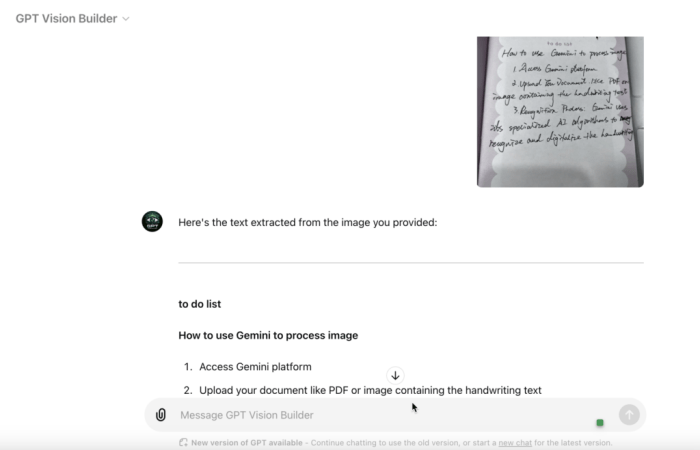
Step 1: Uploading Handwriting. The user begins by uploading a sample of handwriting. This can be achieved through several methods:
- File Upload: The user selects a file from their device. The application should support various file formats, such as images (JPEG, PNG) and PDF documents.
- Drag and Drop: The user drags and drops a file directly into a designated area within the application.
- Image Capture: The user captures an image of their handwriting using a device’s camera.
Step 2: Processing and Analysis. After uploading, the application processes the handwriting. This step involves several stages:
- Image Preprocessing: The application cleans and prepares the image, which may include tasks such as noise reduction, skew correction, and binarization (converting the image to black and white).
- Feature Extraction: The AI extracts relevant features from the handwriting, such as stroke patterns, character shapes, and spacing.
- Interpretation: The AI analyzes the extracted features to interpret the handwriting and generate a digital output.
Step 3: Displaying the Output. The application displays the results in a clear and understandable format. This might include:
- Text Output: The interpreted text of the handwriting.
- Visual Representation: A side-by-side comparison of the original handwriting and the interpreted text.
- Confidence Levels: The application displays the confidence level of the AI’s interpretation for each word or character.
Example Scenario: A user uploads a scanned document containing handwritten notes. The application processes the image, analyzes the handwriting, and presents the interpreted text alongside the original scanned image. The confidence levels are displayed, highlighting areas where the AI’s interpretation might be less certain. The user can then review the output and potentially correct any errors.
Feedback and Error Handling
Effective feedback mechanisms and robust error handling are critical components of a positive user experience. The application should provide clear and informative feedback to the user throughout the process, and it should handle errors gracefully, offering solutions and guidance.
- Feedback Mechanisms: The application should provide real-time feedback to the user. This includes progress indicators during processing, notifications upon completion, and visual cues to highlight any issues. For instance, a progress bar could indicate the progress of the handwriting analysis. Upon completion, a notification could inform the user that the analysis is complete and ready for review.
- Error Handling: The application should be designed to handle errors gracefully. This includes providing informative error messages, suggesting solutions, and preventing data loss. Examples of error handling include:
- Incorrect Interpretation: If the AI misinterprets the handwriting, the application should allow the user to correct the errors. The user could manually edit the interpreted text or provide feedback to improve the AI’s accuracy.
- File Upload Errors: If a file upload fails, the application should display an error message explaining the issue and suggesting possible solutions, such as checking the file format or file size.
- Processing Errors: If the processing fails, the application should provide a detailed error report, explaining the cause of the failure and offering suggestions for resolving the issue.
- Illustrative Example: Suppose the AI misinterprets a word in the handwriting. The application could highlight the misinterpreted word and provide a dropdown menu with alternative interpretations. The user can then select the correct interpretation, and the AI could learn from this feedback to improve its accuracy in future analyses.
Investigating the accuracy and limitations of the app is important for setting realistic expectations.
The performance of any handwriting analysis application is inherently tied to its ability to accurately interpret the nuances of human writing. A thorough understanding of the factors influencing this accuracy, alongside the identification of the application’s limitations, is crucial for establishing realistic expectations and optimizing its utilization. This section delves into the specifics of accuracy, influencing factors, limitations, and potential biases inherent in such a digital tool.
Accuracy and Influencing Factors
The accuracy of handwriting analysis apps is not absolute and varies considerably based on several factors. The application’s performance is often quantified by metrics such as character error rate (CER) and word error rate (WER), which indicate the percentage of characters and words incorrectly identified, respectively. These metrics are often dependent on the characteristics of the input data.The style of handwriting is a primary determinant of accuracy.
Block letters, characterized by distinct and separated characters, generally yield higher accuracy rates compared to cursive writing, where characters are often connected and can be ambiguous. For instance, an app might achieve a CER of less than 1% for printed text but struggle to maintain a WER below 10% for highly stylized cursive scripts.The type of pen or writing instrument also impacts accuracy.
The width and consistency of ink strokes play a significant role. Fine-tipped pens and pencils typically provide clearer strokes, leading to better results. Conversely, broad-tipped markers or ballpoint pens that produce inconsistent lines can pose challenges. Consider the following:
The clarity of the strokes, the spacing between characters, and the overall consistency of the writing are critical factors that influence accuracy.
Paper quality further influences the app’s performance. The presence of bleed-through, show-through, or smudging from ink can obscure the characters, making it difficult for the application to accurately identify the text. High-quality paper with a smooth surface minimizes these issues. Similarly, the scanning resolution and quality also play a crucial role. Low-resolution scans can introduce artifacts and blur, diminishing accuracy.
Limitations of the Application
Despite advancements in AI and machine learning, handwriting analysis apps face several limitations. Understanding these limitations is essential for informed usage.The application might struggle with highly stylized or artistic handwriting. Scripts with elaborate flourishes, unconventional letterforms, or artistic embellishments often present challenges. These scripts deviate from the standard writing patterns the app is trained on, leading to misinterpretations.Poor-quality scans are another significant limitation.
Scans with low resolution, uneven lighting, or distortions can compromise the clarity of the handwriting, hindering accurate interpretation. Handwritten documents that are faded or damaged also pose challenges.The app may also face difficulties with noisy or cluttered documents. Overlapping text, extraneous marks, or backgrounds can interfere with the analysis process, reducing accuracy.The app’s performance is also often limited by its training data.
If the app is primarily trained on a specific language or writing style, its accuracy might be lower when encountering handwriting from different regions or languages.
Potential Biases
Handwriting analysis apps are susceptible to biases, which can affect their performance and interpretation. These biases can stem from the training data used to develop the application.
- Regional Handwriting Styles: Handwriting styles vary across geographic regions. An app trained primarily on handwriting from one region might struggle to accurately interpret handwriting from another region with different writing conventions. For example, the way the letter “g” is formed can differ significantly between different regions.
- Demographic Factors: Training data that does not adequately represent different demographic groups can lead to biases. This includes variations in handwriting styles based on age, gender, and ethnicity.
- Language and Script: The app’s performance is closely linked to the language and script it is designed to recognize. An app trained on Latin script might perform poorly on scripts such as Cyrillic or Arabic, unless specifically trained for those scripts.
- Education and Skill Level: Handwriting quality is often correlated with education and skill. An app may perform better with the handwriting of individuals with higher education levels or professional writers.
Analyzing the various applications of the app across different industries is valuable.
The ability to accurately interpret handwritten text opens doors to numerous applications across diverse sectors, streamlining processes and enhancing accessibility. This handwriting analysis app, leveraging artificial intelligence, promises to revolutionize how information is captured, processed, and utilized. Its potential extends beyond simple text recognition, offering opportunities for data analysis, enhanced communication, and improved accessibility for various user groups.
Healthcare Applications
The healthcare industry can greatly benefit from the handwriting analysis app. The app’s ability to digitize handwritten medical records, prescriptions, and patient notes significantly reduces the reliance on paper-based documentation. This digitization process offers numerous advantages, including improved data accessibility, reduced storage space requirements, and enhanced data security.
- Digitization of Medical Records: The app can convert handwritten patient charts, progress notes, and examination findings into searchable and editable digital formats. This allows medical professionals to quickly access patient history, track treatment progress, and make informed decisions.
- Prescription Processing: Pharmacists can utilize the app to accurately decipher handwritten prescriptions, reducing the risk of medication errors. The app can cross-reference prescriptions with patient records and drug databases to ensure accurate dispensing and identify potential drug interactions.
- Research and Data Analysis: Researchers can employ the app to analyze handwritten clinical trial data and patient surveys. The app’s ability to convert unstructured handwritten data into structured formats facilitates the identification of patterns, trends, and correlations, contributing to improved medical research outcomes.
Education Sector Applications
In education, the app presents several opportunities to improve learning and assessment. The app’s capabilities facilitate more efficient grading, provide personalized feedback, and create interactive learning experiences.
- Automated Grading: Teachers can use the app to grade handwritten assignments, quizzes, and exams automatically. This automation frees up educators’ time, allowing them to focus on lesson planning and student interaction. The app can be trained to recognize various handwriting styles and provide detailed feedback based on predefined criteria.
- Enhanced Note-Taking: Students can use the app to convert handwritten notes into digital text, which allows for easier editing, organization, and sharing. This enhances collaboration and provides a valuable resource for review and study.
- Accessibility for Students with Disabilities: Students with mobility impairments or other disabilities can benefit from the app. They can write on a tablet or other input device, and the app will convert their handwriting into digital text, making it easier to participate in classroom activities and complete assignments.
Finance Sector Applications
The finance sector can also find value in the handwriting analysis app, particularly in document processing, fraud detection, and customer service. The app streamlines document handling, reduces operational costs, and enhances the security of financial transactions.
- Document Digitization: The app can convert handwritten financial documents, such as checks, loan applications, and contracts, into digital formats. This facilitates faster processing, reduces paper waste, and improves data management.
- Fraud Detection: The app can analyze handwriting patterns to identify potential fraudulent activities, such as forged signatures or altered documents. This analysis helps prevent financial losses and protects against fraudulent transactions.
- Customer Service: The app can be integrated into customer service systems to automatically process handwritten customer inquiries and complaints. This streamlines communication and allows for faster response times, enhancing customer satisfaction.
Assisting Individuals with Disabilities
The handwriting analysis app offers significant benefits for individuals with disabilities, especially those with mobility impairments. This technology allows them to interact with digital devices and produce written content more easily.
- Accessibility for Mobility Impairments: Individuals with limited mobility can use the app with various input devices, such as styluses, tablets, or even voice-to-text integration, to input their handwriting. The app converts the handwriting into digital text, enabling them to communicate, create documents, and access digital content.
- Enhanced Communication: The app can be used to convert handwritten notes into digital text, allowing individuals with mobility impairments to communicate with others more effectively. This facilitates participation in meetings, classes, and social interactions.
- Improved Productivity: The app can assist individuals with mobility impairments in completing tasks, such as writing emails, creating reports, and filling out forms, increasing their overall productivity and independence.
“As a high school history teacher, the handwriting analysis app has been a game-changer. Grading used to take hours, especially with messy handwriting. Now, I can grade essays much faster, and I can give more detailed feedback because I’m not spending all my time just deciphering what students wrote. It’s freed up time for me to focus on teaching and interacting with my students. It’s a fantastic tool for any educator!”
Sarah J., History Teacher.
Exploring the security and privacy considerations of the application is a necessary precaution.: Artificial Intelligence App For Analyzing Handwriting
The handling of sensitive user data, including handwritten text, necessitates robust security and a transparent privacy policy. This section delves into the security measures implemented to protect user information, the application’s adherence to data protection regulations, and the strategies employed to anonymize or pseudonymize handwriting data, thereby safeguarding user privacy. Understanding these aspects is critical for building trust and ensuring responsible use of the application.
Security Measures for Data Protection
The application employs a multi-layered security approach to protect user data from unauthorized access, use, or disclosure. These measures are designed to align with industry best practices and relevant data protection regulations.
- Encryption: Data encryption is a cornerstone of the application’s security architecture. All user data, both in transit and at rest, is encrypted using industry-standard encryption algorithms, such as Advanced Encryption Standard (AES).
- Data in Transit: Encryption protocols like Transport Layer Security (TLS) are used to secure data transmitted between the user’s device and the application’s servers. This ensures that the data is protected from eavesdropping and tampering during transmission.
- Data at Rest: Data stored on the application’s servers, including user-uploaded handwriting samples and associated metadata, are encrypted at rest. This means that even if unauthorized access to the servers is gained, the data remains unreadable without the proper decryption keys. The keys are securely managed and rotated regularly to minimize the risk of compromise.
- Access Controls: Strict access controls are implemented to limit access to user data to authorized personnel only. Role-based access control (RBAC) is utilized to ensure that employees and third-party vendors have access only to the data necessary for their specific roles.
- Authentication: Multi-factor authentication (MFA) is implemented to verify user identities, adding an extra layer of security. Users are required to provide multiple forms of verification, such as a password and a one-time code generated by an authenticator app, before gaining access to their accounts.
- Authorization: Authorization mechanisms determine what actions a user is permitted to perform. Users are granted only the necessary permissions, preventing them from accessing data or functionalities beyond their authorized scope.
- Regular Security Audits and Penetration Testing: The application undergoes regular security audits and penetration testing to identify and address potential vulnerabilities. These audits are conducted by independent security experts who assess the application’s security posture and provide recommendations for improvement.
- Data Loss Prevention (DLP): DLP measures are in place to prevent sensitive data from leaving the application’s environment. This includes monitoring and controlling data transfers, enforcing policies to prevent data leakage, and implementing safeguards against data exfiltration.
Privacy Policy and Data Handling
The application’s privacy policy clearly Artikels how user data is collected, used, and protected. It is designed to be transparent and compliant with relevant data protection regulations, such as the General Data Protection Regulation (GDPR) and the California Consumer Privacy Act (CCPA).
- Data Collection: The privacy policy specifies the types of data collected from users, including handwriting samples, user account information, and usage data. It explains the purpose for which each type of data is collected.
- Data Use: The privacy policy describes how user data is used, including for handwriting analysis, improving the application’s performance, and providing personalized recommendations. It also clarifies whether user data is shared with third parties and, if so, under what circumstances.
- Data Retention: The privacy policy Artikels the data retention periods for different types of user data. It specifies how long user data is stored and the criteria used to determine when data is deleted.
- User Rights: The privacy policy informs users of their rights regarding their data, including the right to access, rectify, erase, and restrict the processing of their data. It provides instructions on how users can exercise these rights.
- Compliance with Data Protection Regulations: The application is designed to comply with data protection regulations such as GDPR and CCPA. This includes implementing measures to obtain user consent for data collection, providing users with control over their data, and protecting user data from unauthorized access.
Anonymization and Pseudonymization Techniques
To further protect user privacy, the application employs anonymization and pseudonymization techniques to minimize the risk of identifying individual users.
- Pseudonymization: Pseudonymization involves replacing personally identifiable information (PII) with pseudonyms. Handwriting samples may be associated with unique identifiers rather than user names or email addresses.
- Example: Instead of storing a handwriting sample associated with the user’s email address “[email protected]”, the sample is associated with a unique, randomly generated identifier such as “user_12345”.
- Data Aggregation: Data aggregation involves combining data from multiple users to create aggregated datasets. This makes it more difficult to identify individual users based on their handwriting samples.
- Example: Instead of analyzing individual handwriting samples, the application might analyze aggregated data on letter formation styles across a large group of users.
- Differential Privacy: Differential privacy is a technique used to add noise to data to protect user privacy while still allowing for meaningful analysis. This ensures that the output of the analysis does not reveal information about any individual user.
- Example: When calculating the average slant of handwritten letters, the application adds random noise to the results, ensuring that the average is close to the true value but does not reveal information about the slant of any individual user’s handwriting.
- Secure Data Storage: All handwriting data is stored in secure data centers with robust physical and digital security measures. Access to the data is restricted and monitored.
Discussing the integration capabilities of the app with other systems is a crucial element.
The ability of an artificial intelligence-powered handwriting analysis application to seamlessly integrate with other software and platforms is a critical determinant of its utility and widespread adoption. This integration capability allows the application to move beyond a standalone tool and become a valuable component within existing workflows, enhancing efficiency and data accessibility across various business processes. The following sections will explore the specifics of such integration, including the available APIs and SDKs, and provide an example of how the application can be incorporated into a typical business workflow.
Integration with Software and Platforms
The handwriting analysis application’s integration capabilities are multifaceted, encompassing compatibility with various software and cloud platforms. This versatility is crucial for adapting the application to different operational environments.
- Document Management Systems (DMS): The application can be integrated with DMS like Microsoft SharePoint, Google Drive, and Dropbox. This allows for the direct import of scanned documents or images of handwritten notes, enabling the app to process them directly within the DMS environment. Once the handwriting is converted to digital text, the results can be stored back within the DMS, indexed, and made searchable, significantly improving document retrieval and organization.
This is particularly useful for organizations that rely heavily on paper-based records, such as law firms or healthcare providers.
- Cloud Storage Services: The application’s integration with cloud storage services allows users to store and access their handwritten data from anywhere with an internet connection. This also facilitates collaboration, as multiple users can access and work on the same documents.
- Enterprise Resource Planning (ERP) Systems: Integration with ERP systems like SAP or Oracle can streamline data entry processes. For example, handwritten order forms can be automatically processed and the data imported directly into the ERP system, reducing manual data entry errors and accelerating order fulfillment.
- Customer Relationship Management (CRM) Systems: The application can be integrated with CRM systems like Salesforce or HubSpot to capture and analyze handwritten notes taken during customer interactions. This provides a more comprehensive view of customer interactions, improving personalization and customer service.
- Other Software: Beyond these core platforms, the application can be integrated with a wide range of other software, including note-taking applications, project management tools, and specialized industry-specific software.
Available APIs and SDKs for Integration
Application Programming Interfaces (APIs) and Software Development Kits (SDKs) are the essential components that enable developers to integrate the handwriting analysis application into their own applications. These tools provide a standardized way for different software systems to communicate and exchange data.
- API Functionality: The application’s API exposes a range of functionalities, including image upload, handwriting recognition, text conversion, and result retrieval. Developers can use these API endpoints to build custom integrations. For example, a developer could create a mobile application that allows users to scan handwritten notes, send them to the handwriting analysis application for processing, and then display the converted text within the mobile app.
- SDK Features: The SDK typically provides pre-built libraries, sample code, and documentation to simplify the integration process. This helps developers to quickly incorporate the handwriting analysis functionality into their applications without having to write code from scratch. The SDK might include features like pre-processing algorithms to improve image quality, noise reduction, and handwriting segmentation.
- Authentication and Security: APIs and SDKs incorporate robust authentication mechanisms to ensure that only authorized users and applications can access the handwriting analysis service. Security protocols such as encryption and data masking are used to protect sensitive data during transmission and storage.
- Integration Examples: Developers can use the API to extract data from handwritten forms, create searchable archives of handwritten documents, and integrate handwriting recognition capabilities into custom business applications.
Example of Workflow Integration
Consider a scenario within a healthcare organization where doctors and nurses often take handwritten notes during patient consultations. Integrating the handwriting analysis application into this workflow can dramatically improve efficiency and data management.
- Note Taking: Doctors and nurses take handwritten notes on paper or using a digital pen on a tablet.
- Scanning or Uploading: The handwritten notes are scanned using a document scanner or uploaded as images from a tablet.
- Processing: The application processes the images, performs handwriting recognition, and converts the handwritten text into digital text.
- Data Entry: The converted text is automatically entered into the patient’s electronic health record (EHR) system.
- Data Indexing and Search: The EHR system indexes the digitized notes, making them searchable and accessible for authorized personnel.
- Analysis and Reporting: The EHR system can then analyze the data to identify trends, generate reports, and support clinical decision-making.
This workflow reduces the time spent on manual data entry, minimizes the risk of transcription errors, and enables healthcare professionals to access patient information more quickly and efficiently. The result is improved patient care and reduced administrative overhead.
Examining the cost and pricing models associated with the app is important for potential users.
Understanding the financial implications of utilizing an AI-powered handwriting analysis application is paramount for potential users. This assessment necessitates a comprehensive evaluation of the various pricing strategies implemented by the app developers, along with a comparative analysis against similar tools in the market. A thorough understanding of the cost structure, coupled with an evaluation of feature alignment, empowers informed decision-making and ensures the app’s economic viability aligns with the user’s needs and budget.
Pricing Models Offered
The app’s pricing strategy likely incorporates several models to cater to diverse user needs and usage patterns. These models are designed to provide flexibility and scalability, ensuring that users can select the option that best suits their individual requirements.
- Subscription-Based Model: This model offers access to the app’s features for a recurring fee, typically monthly or annually. It may offer tiered subscriptions, each unlocking different features, usage limits (e.g., number of documents processed per month), or support levels. For example, a “Basic” subscription might offer limited document processing and standard support, while a “Premium” subscription provides unlimited processing, advanced features (such as language support or handwriting style analysis), and priority customer support.
This model is ideal for users with consistent, ongoing needs for handwriting analysis. A real-world example is Adobe Creative Cloud, which uses a subscription model to provide access to its suite of creative applications.
- Pay-Per-Use Model: In this model, users are charged based on their actual usage. This could involve charging per document processed, per page analyzed, or per API call. This model is suitable for users with infrequent or variable needs, as it eliminates the commitment of a subscription. For instance, a user might pay a specific rate for each scanned document analyzed. Cloud computing services like Amazon Web Services (AWS) frequently employ a pay-per-use model for various services, allowing users to pay only for the resources they consume.
- Enterprise Licensing: Designed for larger organizations, enterprise licensing provides customized pricing and features tailored to the specific needs of the business. This may include volume discounts, dedicated support, custom integrations, and on-premise deployment options. Enterprise licenses often involve negotiated contracts and service level agreements (SLAs). This is a common practice for software vendors like Microsoft, which offers enterprise licensing for its various software products.
- Freemium Model: The app might offer a free version with limited features and usage, designed to attract users and encourage them to upgrade to a paid plan for more advanced functionality. The free version may include watermarks on processed documents or restrictions on the number of analyses per month. This strategy allows potential users to test the core features of the app before committing to a paid subscription.
Many mobile apps and software services, like Dropbox, use a freemium model to attract users.
Cost Comparison with Similar Tools
A critical aspect of evaluating the app’s pricing is to compare it with the costs of similar handwriting analysis tools available in the market. This comparative analysis helps users understand the app’s value proposition relative to its competitors.
- Competitor Analysis: Identifying and researching direct competitors is crucial. These competitors might include other AI-powered handwriting recognition software, OCR (Optical Character Recognition) tools, and manual handwriting analysis services.
- Feature Parity: Compare the features offered by each tool. This includes accuracy, supported languages, document formats, integration capabilities, and user interface. For example, if a competitor offers superior accuracy or more extensive language support, this should be considered in the price comparison.
- Pricing Structure Comparison: Analyze the pricing models of each competitor. This involves comparing subscription fees, pay-per-use rates, and enterprise licensing costs. Consider the value received for the price.
- Value Proposition Assessment: Evaluate the overall value proposition of each tool. This involves assessing the quality of the analysis, the ease of use, the availability of support, and any unique features offered. Consider if the price aligns with the overall value provided.
Pricing Alignment with Features and Benefits
The app’s pricing strategy should directly correlate with the features and benefits it offers. This alignment is essential for justifying the cost and providing users with a clear understanding of the value they receive.
- Feature-Driven Pricing: The price of each subscription tier or pay-per-use option should reflect the features available. For example, a higher-priced tier should provide access to more advanced features, such as handwriting style analysis, support for a wider range of languages, or faster processing speeds.
- Accuracy and Performance: The accuracy of the handwriting analysis is a critical factor influencing pricing. Higher accuracy rates, particularly in complex handwriting scenarios, should justify a premium price. If the app consistently provides more reliable results, users are likely to be willing to pay more.
- User Experience: The ease of use and user interface design also impact pricing. A user-friendly interface that simplifies the handwriting analysis process is more valuable.
- Support and Maintenance: The level of customer support and ongoing maintenance (e.g., updates, bug fixes) should be reflected in the pricing. Premium subscriptions often include priority support and access to new features.
- Example: Consider an app that provides advanced handwriting style analysis and offers a very high degree of accuracy. The cost of this application will be higher than an application that only provides basic handwriting recognition, which offers less accuracy. The value provided, however, will be much greater.
Investigating the future trends and potential advancements in this technology is beneficial.
The evolution of handwriting recognition technology is poised for significant advancements, driven by the confluence of increased computational power, sophisticated machine learning algorithms, and the growing demand for digital interaction. This analysis explores the trajectory of this technology, focusing on improvements in accuracy, speed, and linguistic versatility, alongside innovative features that will shape its future applications. The integration of these advancements will not only enhance the capabilities of existing applications but also unlock new possibilities across various sectors.
Improvements in Accuracy, Speed, and Linguistic Versatility
Handwriting recognition systems are expected to witness substantial improvements across several key dimensions. Accuracy, currently a critical performance metric, will be refined through the utilization of more advanced deep learning models, such as transformers and graph neural networks, capable of capturing intricate contextual information within handwritten text. These models, trained on massive datasets of diverse handwriting styles, will enable the system to decipher even the most challenging scripts with greater precision.Speed is another critical area.
Processing times will decrease dramatically with optimized algorithms and specialized hardware, such as GPUs and TPUs, accelerating the computational processes. This enhanced speed will be crucial for real-time applications, such as live transcription during lectures or meetings.The linguistic versatility of handwriting recognition will expand significantly. Current systems often struggle with less common languages and dialects. Future systems will incorporate multilingual support by training models on datasets that include a wider range of scripts, including those with complex characters and writing systems.
- Accuracy Enhancement: The adoption of advanced neural network architectures, coupled with transfer learning from pre-trained models, will enable systems to generalize better across diverse handwriting styles and reduce error rates. For example, a system trained on a dataset of Latin script could leverage pre-trained knowledge to improve its accuracy in recognizing Cyrillic or Greek alphabets.
- Speed Optimization: Hardware acceleration, through the use of specialized processors and optimized software libraries, will significantly reduce processing times. This is particularly crucial for real-time applications, where low latency is essential.
- Linguistic Expansion: The development of multilingual models will allow the system to recognize and translate text in multiple languages, supporting diverse scripts, including those with complex characters and writing systems.
Incorporating Innovations: Complex Handwriting Styles and Handwritten Diagrams
The incorporation of innovations will significantly broaden the scope of handwriting recognition applications. Support for more complex handwriting styles, including cursive, artistic scripts, and variations due to age or disability, will become increasingly important. This necessitates the development of models that can handle greater variability and ambiguity in input data.The ability to understand handwritten diagrams, including mathematical equations, chemical structures, and architectural sketches, will revolutionize fields like education, science, and engineering.
This capability requires the system to recognize not only individual characters and symbols but also the spatial relationships between them.
- Complex Handwriting Styles: The use of generative adversarial networks (GANs) to augment training datasets with synthetic handwriting variations can improve the model’s robustness to diverse handwriting styles.
- Handwritten Diagrams: The integration of object detection and spatial reasoning algorithms will enable the system to interpret the elements within diagrams, such as lines, shapes, and annotations, and understand their relationships. For instance, in the field of chemistry, the system could identify and interpret handwritten chemical structures.
Futuristic Vision of Technology Usage
Envision a future where handwriting recognition technology is seamlessly integrated into daily life. Consider the following scenarios:
- Smart Classrooms: Students use digital pens to take notes during lectures, and the system instantly transcribes the handwritten text into editable documents, which are accessible across devices. The system can also automatically convert handwritten diagrams into digital formats, making them easier to share and annotate. Furthermore, the system could analyze student handwriting patterns to provide personalized feedback and identify areas where students may need additional support.
- Medical Field: Doctors use digital pens to record patient information during examinations. The system automatically transcribes the handwritten notes into electronic health records, ensuring accuracy and saving valuable time. This technology could also be used to recognize and interpret handwritten prescriptions, reducing errors and improving patient safety. The system might also be capable of analyzing handwriting characteristics to identify early signs of neurological disorders.
- Creative Industries: Artists and designers use digital pens and tablets to create sketches and illustrations. The system automatically converts their handwritten designs into vector graphics, allowing them to easily edit and refine their work. This technology could also be used to generate 3D models from handwritten sketches.
Evaluating the accessibility features and support options of the app is vital for inclusivity.
Ensuring accessibility is paramount in the development of any digital tool, and this holds especially true for an application designed to analyze handwriting. The ability to cater to users with diverse needs, including those with visual impairments, motor skill limitations, or cognitive differences, is critical for promoting inclusivity and maximizing the app’s utility. This section details the accessibility features, support options, and assistance mechanisms implemented to guarantee ease of use for all users.
Accessibility Features, Artificial intelligence app for analyzing handwriting
The incorporation of accessibility features within the handwriting analysis app is crucial for enabling a broad spectrum of users to effectively interact with and benefit from its functionalities. This section will explore the specific features that contribute to a more inclusive user experience.
- Screen Reader Compatibility: The application is designed to be fully compatible with screen readers, such as JAWS, NVDA, and VoiceOver. This means that users with visual impairments can have the text content, interface elements, and analysis results read aloud. This includes:
- Properly labeled interface elements: All buttons, text fields, and other interactive elements are programmatically labeled, allowing screen readers to accurately identify their function.
- Alternative text for images: Descriptive alternative text (alt text) is provided for all images and visual representations, ensuring that users with visual impairments can understand the context and meaning of the visual information.
- Dynamic content updates: The application is designed to notify screen readers of any changes in content or interface updates, such as analysis results or error messages, ensuring users receive timely and complete information.
- Adjustable Font Sizes and Customization: The app provides options for users to customize the font size, font style, and color contrast of the displayed text. This is particularly beneficial for users with low vision or reading difficulties. The user can adjust:
- Font Size: Users can increase or decrease the font size to suit their visual needs.
- Font Type: The application offers a selection of readable font styles.
- Color Contrast: The application provides options for high-contrast color schemes, such as a dark mode or customizable color palettes, to enhance readability.
- Alternative Input Methods: Recognizing that not all users can easily use a touchscreen or stylus, the application supports alternative input methods.
- Keyboard Navigation: The entire application interface can be navigated using a keyboard, allowing users to move between elements and interact with the application using the tab key, arrow keys, and enter key.
- Voice Control: The application is designed to be compatible with voice control software, enabling users to control the application using voice commands.
- Mouse Alternatives: Support for alternative pointing devices, such as trackballs or head-mounted pointers, is integrated.
- Customizable Interface Layout: The app offers customizable interface layouts to enhance the user experience.
- Users can rearrange the position of elements.
- The application allows for resizing of the different elements.
- The application provides the option to hide elements that are not required by the user.
Customer Support Options
Comprehensive customer support is essential to ensure that users can effectively utilize the app and resolve any issues they may encounter. This section Artikels the support options available to users.
- Frequently Asked Questions (FAQs): A comprehensive FAQ section is available on the app’s website and within the application itself. The FAQ covers common questions and troubleshooting steps, addressing a wide range of topics, including:
- Installation and setup
- Application features and functionality
- Troubleshooting common issues
- Account management and billing
- Tutorials and User Guides: Detailed tutorials and user guides are provided to assist users in understanding the app’s features and functionality. These resources are available in multiple formats, including:
- Video tutorials: Step-by-step video demonstrations of key features and workflows.
- Written guides: Comprehensive documentation with screenshots and detailed explanations.
- Interactive tutorials: Guided walkthroughs within the application itself.
- Contact Information and Support Channels: Users can contact the support team through multiple channels:
- Email support: Users can submit support requests via email and receive timely responses from the support team.
- Online chat support: Real-time chat support is available during specified hours, allowing users to receive immediate assistance.
- Phone support: A dedicated phone line is available for users who prefer to speak directly with a support representative.
- Community Forums: A dedicated online forum allows users to connect with each other, share tips and tricks, and seek assistance from other users.
Help and Assistance for Users with Disabilities
The application is specifically designed to provide help and assistance to users with disabilities, ensuring ease of use and accessibility. This section details the mechanisms in place to facilitate a positive user experience.
- Contextual Help: The application provides contextual help throughout the interface, offering guidance and explanations at the point of need. This includes:
- Tooltips: Brief descriptions of interface elements appear when the user hovers over them.
- Inline help: Help text is integrated directly within the application, providing immediate assistance.
- Help buttons: Buttons that provide access to additional information.
- Error Handling and Feedback: The application provides clear and informative error messages to guide users in resolving any issues they encounter.
- Error messages are designed to be easy to understand.
- The application provides suggestions for resolving errors.
- The application provides feedback on user actions.
- Personalized Support: Users with disabilities can request personalized support from the support team. This includes:
- Assistance with setting up accessibility features.
- Customized training on the application’s features.
- Escalation of complex issues to specialized support personnel.
- User Feedback Mechanisms: The application provides mechanisms for users to provide feedback on their experience and suggest improvements. This includes:
- Feedback forms: Users can submit feedback through dedicated forms.
- User surveys: Surveys are conducted periodically to gather feedback on user satisfaction.
- Contact for accessibility issues: A dedicated email address is available for reporting accessibility issues.
Concluding Remarks

In conclusion, the artificial intelligence app for analyzing handwriting showcases a powerful fusion of technology and human interaction. The applications of this technology are diverse and hold significant potential for the future, ranging from healthcare and education to finance and accessibility. As the technology continues to evolve, with improvements in accuracy, support for diverse handwriting styles, and expanded integration capabilities, it is poised to become an indispensable tool in our increasingly digital world.
This ongoing development will likely reshape how we handle and interpret handwritten data, driving efficiency, accessibility, and innovation across various sectors.
Question Bank
How does the app handle different handwriting styles?
The app uses machine learning algorithms that are trained on vast datasets of handwriting samples. This allows the app to adapt to various styles, although accuracy can vary based on the distinctiveness and clarity of the handwriting.
What security measures are in place to protect user data?
The app employs encryption to protect data during transmission and storage. Access controls and adherence to data protection regulations are also implemented to ensure user privacy.
Can the app recognize handwriting in multiple languages?
Many handwriting analysis apps support multiple languages. The availability depends on the specific app and its training data. Check the app’s features to confirm language support.
What are the main limitations of the app?
The app may struggle with extremely poor handwriting, complex layouts, or low-quality scans. Accuracy can also be affected by the writing instrument and the paper quality.
How is the app priced?
Pricing models vary, including subscription-based, pay-per-use, and enterprise licensing. The pricing typically reflects the features offered, such as the volume of processing and the level of support.